
How CPQ Software Interprets CAD Drawings for Configuration
Great, a new order is coming through to your sales department. The email has been received and it’s a big custom order and word has got around the office quickly. The Sales team is getting excited, but for the Operations and Finance Teams, they’ve unfortunately seen this movie play out before.
Somewhere between the sales team’s excitement and the engineering department’s groaning inbox, a custom order quietly begins its long, slow journey towards becoming an actual quote. Three days pass. Then five. The customer, who was ready to buy, is now merely waiting. And in that gap between enthusiasm and delivery, deals quietly die.
That gap is exactly what CPQ software, integrated with Computer-Aided Design (CAD) systems, was built to close. Configure, Price, Quote (CPQ) software has grown into something far more powerful than a quoting tool.
Let’s dive into how a quality, pricing-embedded CPQ software solution like Velon® – when integrated with CAD systems becomes the intelligent bridge between what a customer wants and what engineering can build. And it does this in minutes, not days.
The Engineering Problem That CPQ Solves
Consider two everyday scenarios.
A facilities manager at a large logistics firm needs a custom conveyor system. She knows the length she needs, the load capacity, and the materials. Traditionally, her request would travel through several departments before a drawing even existed. With CPQ connected to a CAD platform, she selects her specifications, and the system instantly generates a validated technical drawing, a bill of materials, and a price. No engineering bottleneck. No errors in translation.
Or picture a structural steel fabricator quoting bespoke beams for a construction project. Every order is different. Every drawing used to be manual. Now, the sales representative selects the dimensions and grade, and the CPQ system passes those values directly to the CAD template. The drawing updates automatically. The quote is accurate. The customer gets an answer the same day.
This is not science fiction. This is what well-designed pricing-infused CPQ software does.
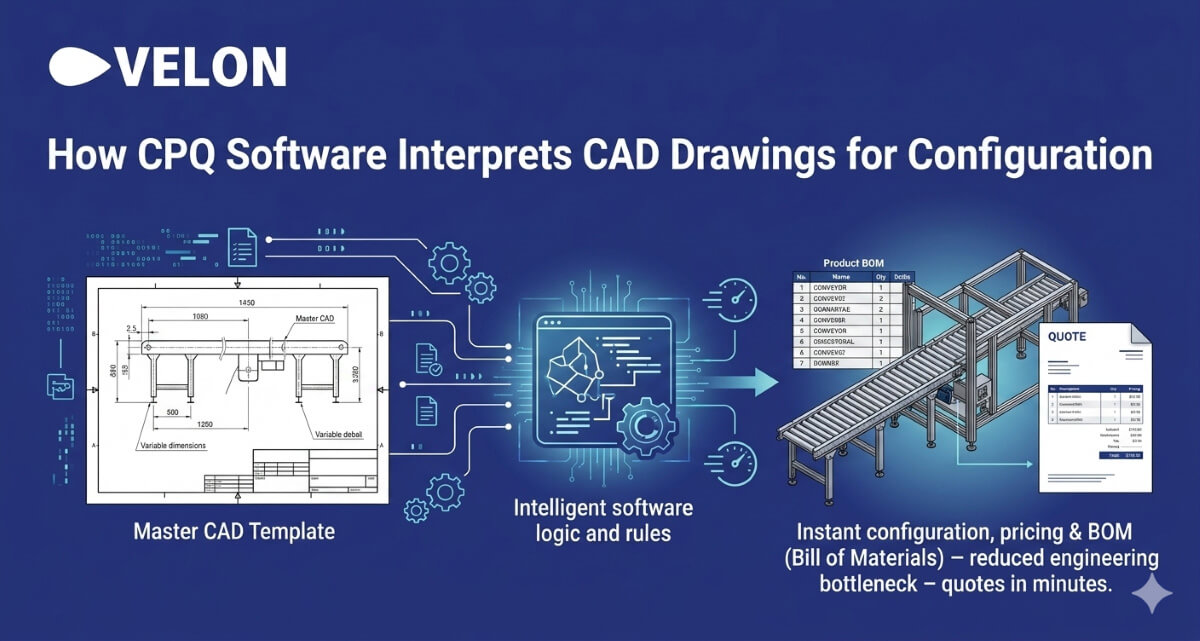
How CPQ Actually Reads and Interprets CAD Drawings
The process is elegant once you understand the logic beneath it:
- Data mapping and templating: Engineers build master CAD templates with variable dimensions and components. These templates define the boundaries of what can be configured and customised.
- Parametric rules generation: The CPQ system maps sales options directly to CAD parameters. Selecting “3-metre length”, for instance, can automatically instruct the CAD model to render at 3,000mm.
- Real-time interpretation: As a sales representative works through the configurator, each selection is passed to the CAD system instantly. The model updates in the background without any manual design work.
- Visualisation rendering: The updated model can be rendered within the CPQ interface, giving both the sales team and the customer a live view of the configured product.
- Automated output generation: Once the configuration is confirmed, the system produces a 3D model, a 2D drawing in PDF or DWG format, and a fully detailed bill of materials, ready for production.
What CPQ CAD Drawing Interpretation Means for Your Business
Beyond the technical elegance, the business case is compelling. Quality pricing-led CPQ software with CAD integration delivers:
- Reduced engineering time by eliminating manual design revisions for every custom quote, with some organisations reporting reductions in engineering effort of up to 95%.
- Greater accuracy between what was quoted and what can be manufactured, eliminating costly rework and returns.
- Faster sales cycles, compressing quote turnaround from several days to a matter of minutes.
- Validation at the point of sale, so that an incompatible configuration is flagged before it ever reaches the factory floor.
- Automatic BOM extraction, pulling part numbers, quantities, and materials directly from the CAD drawing so the production team works from a single source of truth.
For finance leaders, this translates into tighter margin control and fewer costly surprises late in the production cycle. For operations managers, it means engineering resources are freed to focus on innovation rather than repetitive drawing revisions.
The bottom line is straightforward: when pricing intelligent software like Velon® speaks the same language as your engineering systems, your entire business moves faster, smarter, and more profitably. Talk to one of our CPQ experts today to learn how.
Frequently Asked Questions on How CPQ Interprets CAD Drawings for Configuration
Does CPQ replace our CAD software?
+
Not at all. CPQ works alongside your existing CAD platforms such as SolidWorks, Autodesk Inventor, or AutoCAD. It automates the communication between the two systems rather than replacing either one.
What happens if a customer selects an impossible configuration?
+
A well-integrated CPQ system validates configurations against the engineering rules embedded in the CAD templates. Incompatible selections are flagged and blocked before a quote is generated.
Is CAD-CPQ integration only relevant for large enterprises?
+
No. Mid-sized manufacturers with even moderate product complexity can see significant returns, particularly in quoting speed and reduction of engineering rework on custom orders.