
How to Avoid Problems Migrating from Excel to CPQ Software
Excel is brilliant at many things, but it was never built to carry the weight of complex quoting, pricing control and commercial governance across a growing mid-level or enterprise company. When a business moves from spreadsheets to CPQ, the real risk is not the software itself, but the habits, assumptions and shortcuts that come with the old way of working.
We see it every single day. A dedicated sales professional sits at a desk, opening three different workbooks just to check compatibility rules before completing a single customer quotation. Elsewhere, your engineering team is routinely pulled away from genuine product innovation to manually validate a routine sales quote. Meanwhile, the finance director watches silently as margins erode because pricing varies wildly depending entirely on which individual happens to populate the cells that morning.
When your organisation scales, your product combinations widen, and your transaction volume multiplies, the spreadsheet ceases to be an asset. It becomes a beautiful, fragile cage.
You may have already realised this. Perhaps you have made the executive decision to leave the world of manual cells behind and graduate to a pricing smart Configure, Price, Quote (CPQ) software solution like Velon®. Congratulations are certainly in order. You are stepping towards the compounding commercial gains that define modern commercial excellence.
However, a sobering reality awaits the unprepared leader. An enterprise can easily invest money into a top-tier digital transformation, only to end up with a platform that the team simply cannot or will not use.
Migrating from Excel to a dedicated CPQ system is not merely a software installation project. It is a profound business culture evolution.
To ensure your business lands safely on the profitable side of this digital divide, let us walk through six critical problems you must avoid, and explore how a pricing-infused CPQ framework provides the ultimate foundation for sustainable growth
The Top 6 Excel to CPQ Software Implementation Problems to Avoid
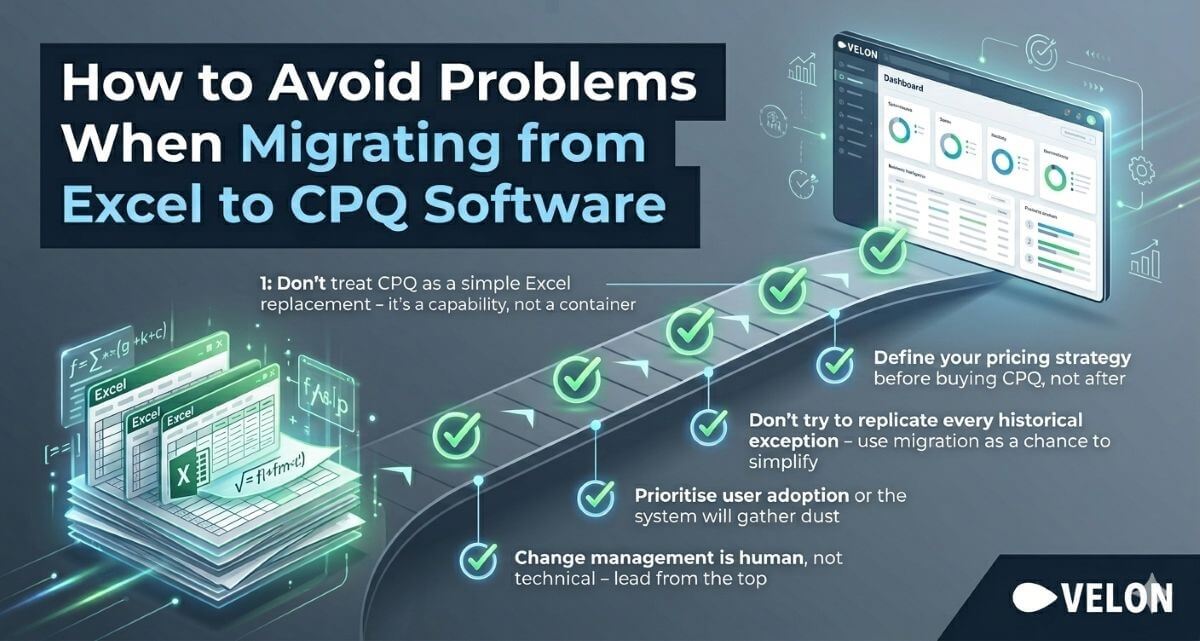
- ✅ Problem 1: Don’t treat CPQ as a simple Excel replacement – it’s a capability, not a container
- ✅ Problem 2: Define your pricing strategy before buying CPQ, not after
- ✅ Problem 3: Clean your data first – garbage in, garbage out
- ✅ Problem 4: Don’t try to replicate every historical exception – use migration as a chance to simplify
- ✅ Problem 5: Prioritise user adoption or the system will gather dust
- ✅ Problem 6: Change management is human, not technical – lead from the top
Read on for a deep dive
Problem 1: Treating CPQ as a Like-for-Like Replacement for Excel
The very first mistake, and perhaps the most damaging, is thinking about your new CPQ software the way you thought about your old spreadsheets.
Excel was a container. CPQ is a capability.
Modern CPQ software does not just store prices and configurations. It;
- Applies dynamic configuration rules
- Generates real-time Bills of Materials
- Calculates costs across materials, labour and overhead
- Applies pricing logic in a controlled, consistent and commercially intelligent way
When it includes an embedded pricing engine, as the best solutions do, it becomes the system that connects what you sell to what you can profitably deliver.
Businesses that treat their CPQ migration as a simple data transfer are setting themselves up for disappointment. The renewed focus on what you want to achieve must begin before implementation, not after.
Ask these questions early:
- What pricing strategies do we want to execute that we simply could not in Excel?
- Where are we currently leaving profit on the table due to inconsistent quoting?
- How do we want pricing decisions to work across regions, channels and customer segments?
The answers to those questions should shape your configuration, not the other way around.
Problem 2: Moving Without a Clear Pricing Strategy
One of the biggest failures is buying CPQ before defining what the business wants pricing to achieve. If the organisation is simply replacing Excel with a faster quoting tool, it may miss the chance to improve margin, win rate and price consistency. CPQ should support a strategy, not create one by accident.
Quoting becomes a purely administrative race against time, leaving no room for strategic agility. If you merely copy those exact manual workflows into a new application, you have not transformed your business. You have simply automated your inefficiencies.
CPQ software exists to support an entirely new, sophisticated way of operating. It is an opportunity to look at how you differentiate your business, quantify true customer value, and establish clear pricing corridors that protect your gross margins.
Pricing-infused CPQ like Velon® bring these capabilities together natively, so that configuration accuracy, real-time cost visibility, pricing control and analytical insight operate as one continuous commercial process rather than a series of disconnected handoffs.
How to Steer Clear of This Pitfall
- Establish your target commercial outcomes and strategic pricing methodologies before the software implementation begins, never after.
- Design your future workflows around where you want your business to be in five years, rather than mimicking the technical limitations of your historical spreadsheets.
- Ensure your executive leadership team remains fiercely aligned on these strategic goals throughout the journey so the project implementation never devolves into a mere technical IT exercise.
Problem 3: Treating Data as an Afterthought
Excel migrations often fail because the data underneath them is messy, incomplete or spread across too many places. Pricing rules, product attributes, customer terms and cost inputs must be clean enough to trust, because CPQ only works well when its logic is built on reliable data. Without that foundation, teams simply move confusion into a more expensive environment.
How to Steer Clear of This Pitfall
The best migrations start by identifying the single source of truth for products, costs and commercial rules.
They also define who owns each data set and how it will be maintained after go-live.
- Audit your data repositories early to ensure every piece of information stems from what you know to be a single, undisputed source of truth.
- Establish a rigorous data cleansing protocol to rationalise product options, resolve conflicting attributes, and update real time material and labour cost metrics
That discipline matters because the quality of the quote depends on the quality of the information feeding it
Problem 4: Drowning the Implementation in Operational Exceptions
In the wild, ungoverned plains of Microsoft Excel, creating a unique exception for a specific client is as simple as manually typing a new number into a cell or adding a custom tab. Over a decade of operations, an enterprise can easily accumulate thousands of these highly specific, irregular pricing arrangements, custom discount structures, and bespoke manufacturing variations.
When migrating to a structured CPQ tool, enthusiastic project teams often try to configure every single historical exception into the new software logic. This is a recipe for disaster. Attempting to automate highly irregular anomalies inflates implementation timelines, drives up development costs, and results in an unnecessarily complex environment that is incredibly difficult to maintain.
How to Steer Clear of This Pitfall
- Empower a single, senior ultimate decision maker with the absolute authority to say a firm no when project teams begin straying down the rabbit hole of exceptional edge cases.
- Cleanse and standardise your commercial agreements, standard pricing templates, and discount rules before attempting to write them into software code.
- View the migration as a perfect operational circuit breaker to simplify your product configurations and standardise your core business processes.
Problem 5: Ignoring User Adoption
A CPQ system can be technically excellent and still fail in practice if salespeople do not trust it or find it too slow to use. The same applies to finance leaders, operations managers and product teams, who all need different levels of clarity and control. Adoption is not a soft issue. It is the difference between a working process and a shelfware purchase.
How to Steer Clear of This Pitfall
- Identify your legacy spreadsheet historians, the individuals who hold the master keys to your current complex macro workbooks and make them core co-owners of the new migration project.
- Communicate the overarching corporate vision consistently, ensuring every single team member understands exactly why the business is making this leap and what they stand to gain.
- Prioritise extensive training and skill development so that users feel confident, competent, and fully supported as the old spreadsheets are phased out.
Problem 6: Underestimating Change Management
Many migrations fail because leaders focus on technology and forget that the real change is human. Sales teams must learn new quoting behaviour, finance teams must trust new controls, and operations teams must rely on more structured order information. That takes communication, training and sponsorship from the top.
A successful rollout needs visible leadership, clear milestones and simple messages about why the move matters.
It also helps to explain the business impact in practical terms, such as fewer quote errors, better margin protection and faster order readiness. People do not embrace transformation because it is clever. They embrace it because it makes their work better.
The Strategic Path Forward: CPQ Software Implementation as Commercial Transformation
The businesses that navigate this migration well share a common characteristic. They do not treat it as an IT project. They treat it as a commercial transformation.
The difference matters enormously. A commercial transformation has executive sponsorship, a clearly defined pricing strategy, realistic expectations from every team involved, clean data, and a long-term vision for how pricing, configuration and quoting will create competitive advantage.
Get it wrong, and you spend significant resource building something that your team works around rather than with
The move from Excel to CPQ is not a technical upgrade.
It is the moment your organisation decides to treat pricing and quoting as strategic capabilities rather than administrative tasks.
When those ingredients are in place, the results are striking. Shorter sales cycles. Stronger margins. Faster quoting. Better alignment between what is sold and what operations can deliver. Check out Velon’s ROI Calculator to calculate your company’s potential benefit from CPQ Software or talk to one of our friendly experts to get started on your CPQ journey today.
Frequently Asked Questions on Avoiding CPQ Software Implementation Issues
How long does a typical migration from Excel to CPQ software take, and what affects the timeline most?
+
Timelines vary considerably, but for a mid-to-large enterprise, a realistic implementation ranges from 6 to 12 weeks. The single biggest factor affecting timeline is not the technology but the quality of your existing data and the clarity of your commercial processes. Businesses with clean, well-structured data and a defined pricing strategy will always implement faster than those arriving with fragmented spreadsheets and undocumented rules. Scope creep driven by exception-handling is the second most common cause of extended timelines.
What is the biggest reason migrations fail?
+
The most common failure is treating CPQ like a technology purchase instead of a business change. When strategy, data and user adoption are not addressed together, the system struggles to create lasting value.
Can CPQ help if our products are highly customised?
+
Absolutely, and that is often where it creates the most value. CPQ is designed to manage configuration rules, ensure valid combinations and workflows to produce quotes that reflect the reality of complex products.
What should we measure after go-live?
+
Start with quote cycle time, error rates, discount discipline, margin performance and user adoption. Those metrics show whether the new process is improving both efficiency and profitability.
Why pair CPQ with pricing intelligence?
+
Because CPQ handles the structure of the quote, while pricing intelligence strengthens the commercial decision behind it. Together, they help businesses quote accurately, price more strategically and protect profit more consistently.
Migrating from Excel is not just about leaving spreadsheets behind. It is about building a commercial system that helps the business sell more intelligently, operate more smoothly and protect profit with less effort.